

Introduction to Python Programming - Part - II
Instructor: Dr. Sanasam Ranbir Singh
This tutorial is prepared by Mr. Vijay Purohit, Dept. of CSE, IIT Guwahati
1. FUNCTIONS
---
- It is a named unit of a group of program statment. It can be invoked from other parts of the program as and when require.
- It is basically a subprogram that acts on a data and can returns data.
> Relatable f:X→Y y=f(x)?
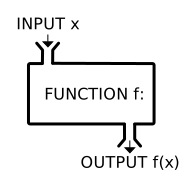
- User Defined Functions: These are defined by the user at the time of writing a program as per requirements of the program.
- Built-in (or Library) funtions: There are the part of library, as we have seen in last class print(), int(), float(), input()
#Some Built-In Funtions: input(), float(), type(), print()
price = float(input('Enter the price: '))
print(type(price))
print("Current Price mentioned is {}".format(price))
print(f"The cost is {price} Rupees.")
2. Function Definition and Call
```
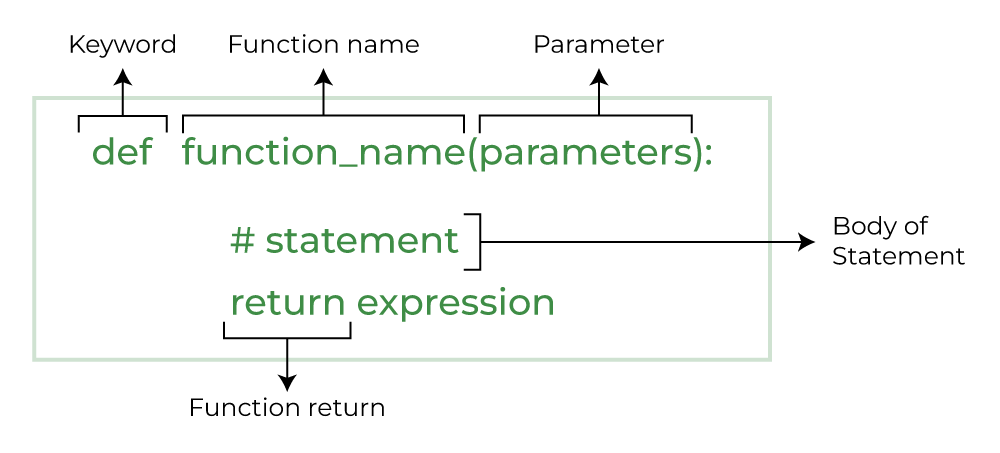
def function_name(parameter: data_type) -> return_type:
""" docstring """
body of the function
return expression
```
- Take Care of Indentation
- To execute a funtion, you must call it
- When a function is called, the interpreter jumps to that function and executed the statments in its block. Then, when the end of the block is reached, the interpreter jumps back to the part of the prgram that called the function, and the program resmes execution at that point.
#We defined a function named message. (notice the colon)
def message():
  print("Welcome to LAB-02.")

#call the message function
message()#FLOW OF PROGRAM
print("1. statment BEFORE the function definiton with parameters")
#Function Definition with PARAMETERS
def message(name):
print("Welcome to LAB-02 of "+name)
print("2. statment AFTER the function definiton")
#call the message function with ARGUMENTS
message("Python class")
print("3. statment AFTER the function CALL with Arguments")#for people with prior experience in langugages like c/c++ or java
# def add2nums(num1, num2) -> int: #with syntax 1
def add2nums(num1: int, num2: int) -> int: #with syntax 2 data type -> return type
""" This functions add two numbers""" #doc string
num3 = num1+num2
return num3 # return statment
num1, num2 = 5, 10
ans = add2nums(num1, num2) #function call
print(f"The addition of {num1} and {num2} is: {ans}.")
# about docstring\
#Syntax: print(function_name.__doc__)
#print(add2nums.__doc__)3. Types of Arguments
- Default Arguments:
Once we have a default argument, all the arguments to its right must also have default values.
#def fun_arg(x=1, y, z=3):
def fun_arg(x, y, z=3):
  print("x: ", x)
  print("y: ", y)
  print("z: ", z)

#fun_arg(1, 2)
fun_arg(1, 2, 4)- Keyword Arguments:
Using this way, the order(position) of the arguments can be changed.
Keyword arguments must follow positional arguments.
def courseName(firstName, lastName):
  print(firstName, lastName)

courseName(firstName="Python-", lastName="Programming") #keywords arguments
courseName(lastName="Programming ", firstName="Python-") #out of order
courseName("Python-", lastName="Programming 2") #1 positional, 1 keyword- Variable Length Arguments:
variable number of arguments to a function
*args(non-keyword arguments)**kwargs(keyword arguments)
def varArgs(*argv):
  for item in argv:
    print(item, end="-")

varArgs('1', '2', '3', '4', '5', '6', '7', '8', '9')
print()
def varArgs(**keyArgv):
  for key,value in keyArgv.items():
    print(key,"-", value, end="|")

varArgs(one='1', two='2', three='3', four='4', five='5', six='6', seven='7', eight='8', nine='9')
4. Return Statement
```
syntax: return [expression_list]
```
It can consist of a variable, an expression, or a constant which is returned to the end of the function execution
5. Recursive Function
A function calling itself.
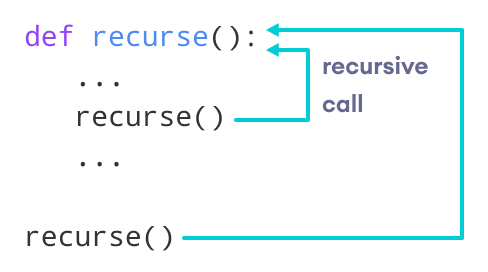
def factorial(x):
  """This is a recursive function to find the factorial of an integer"""
  print(x, end='*')
  if x == 1:
    return 1
  else:
    return (x * factorial(x-1))
num = 6
print("\nThe factorial of", num, "is", factorial(num))
More about it here
6.Variables Type
- Global Variables
A variable declared outside of the function or in global scope.
x = "global"
def foo():
  print("inside foo func:", x)
foo()
print("main:", x)x = "global"
def foo():
#global x
x = x*2
print("inside foo func:", x)
foo()
print("main:", x)- Local Variables
A variable declared inside the function's body or in the local scope.
def foo():
  y = "local"
  print("inside foo func:", y)
foo()
print("main:", y) #error
7. Modules
A file that contains Python code.
import math
#import math as m
def area(radius):
  #return m.pi * radius**2
  return math.pi * radius**2
area(3.4)
LISTS AND TUPLES
A sequence is an object that contains multiple items of data.
Two of the Fundamental Sequence Types: lists and tuples.
- Both can hold various types of data.
- Difference: a list is mutable, which means that a program can change its contents.
Surrounded by square brackets [ ]
- But a tuple is immutable, which means that once it is created, its contents cannot be changed.
Surrounded by parenthesis ( )
# List of even integers
even = [2, 4, 6, 8, 10]
print("even: ",even)
print("even size: ",len(even)) #length of list

# List of names
names = ["python", "c++", "rust"]
print("names: ",names)

# List with mixed data types
mixture = [1, "Hi", 3.4]
print("mixture: ",mixture)
print("mixture size: ",len(mixture)) #size of list

# Nested List
nested = ["top", [8, 4, 6], ['a']]
print("nested: ",nested)
print("nested size: ",len(nested)) #size of list

# list() function to convert type of objects to list
numbers = list(range(1, 10, 2))
print("numbers: ",numbers)
1. Accessing Elements
- Refer to the index number. Use the index operator [ ] to access an item in a list.
- The index must be an integer.
- Nested lists are accessed using nested indexing.
# Nested List
nested = ["top", [8, 4, 6], ['a']]
print("nested[0]: ",nested[0]) # 1st element
print("nested[1]: ",nested[1])
print("nested[1][0]: ",nested[1][0]) # multi-dimension
print("nested[2]: ",nested[2])- Negative Indexing
- represent positions from the end of the array. (means beginning from the end).
# Nested List
nested = ["top", [8, 4, 6], ['a']]
print("nested[-1]: ",nested[-1]) # last element
print("nested[-3]: ",nested[1]) #last third item
print("nested[1][-1]: ",nested[1][-1]) # multi-dimension
2. List Functions
2a. Append Method:
one element/tuple/existinglist at a time can be added to the list by using append() function
even = [2]
even.append(8)  #append elements
even.append(12)
print("even: ",even)

names = ["python", ]
names.append(("c++", "java")) #append tuples
print("names: ",names)

nested = ["top", 'a']
nested.append(even)
print("nested: ",nested)
2b. Insert Method:
To insert elements at the desired position
```
list.insert(position, value)
```
even = [2, 8, 12]
even.insert(1, 4)
print("even: ",even)
even.insert(3, 10)
print("even: ",even)
2c. Remove Method
remove the first occurrence of the specified item
even = [2, 4, 8, 12, 4]
even.remove(4)
print("even: ",even)
even.remove(4)
print("even: ",even)
2d. Pop Method
by default remove only the last element of the list. To remove an element from specific position of the list, the index of the element is passed as an argument.
- Del Statment
even = [2, 4, 8, 12, 4]
item = even.pop()
print("item: ",item)
print("pop even: ",even)
even.pop(1)
print("pop even: ",even)

even = [2, 4, 8, 12, 4]
del even[2]
print("del even: ",even)
2e. Sort Method
sort elements in ascending order
2f. Reverse Method
reverse the list
even = [2, 4, 8, 12]
even.reverse()
print("even: ",even)

even = [14, 12, 8, 4, 2]
even.sort()
print("even: ",even)
2g. min and max function
even = [12, 4, 16, 8, 10, 2, 22]
print("min in even: ",min(even))
print("max in even: ",max(even))
3. Some Operations on Lists
3a. Contcatenating Lists
list1 = [1, 2, 3, 4]
list2 = [8, 7, 6, 5]
list3 = list1 + list2
print(list3)
3b. Copying Lists
both lists will reference the same list in the memory
list1 = [1, 2, 3, 4]
list2 = [8, 7, 6, 5]
list2 = list1 #both lists will reference the same list in the memory
list1[0] = 0
print(list1)
print(list2)
list1 = [1, 2, 3, 4]
list2 = []+list1 #different copy
list1[0] = 0
print(list1)
print(list2)
3c. Finding items in Lists Using in Operator
```
syntax: item in list
```
returns true if item is found in the list, or false otherwise
list1 = [1, 2, 8, 7, 6, 5, 3, 4]
if 3 in list1:
  print("found")
else:
  print("not found")
**3d. * operator (repetition operator)**
```
syntax: list * n
left side: list
right side: integer
```
It makes multiple copies of a list and joins them all together
numbers = [1,2,3]*3
print(numbers)
4. List Slicing
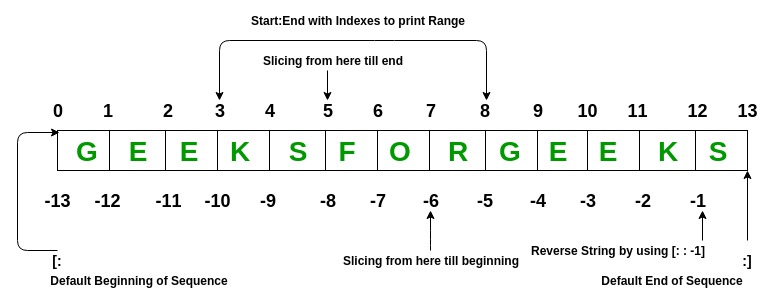
slices: subsections of a sequence
```
list_name[start: end]
```
- start is the index of the first element.
- end is the index marking the end of the slice
- elements include from start up (but not including) end
days = ['Sunday', 'Monday', 'Tuesday', 'Wednesday', 'Thursday', 'Friday', 'Saturday']
mid_days = days[2:5]
print("days: ",days)
print("mid_days: ",mid_days)

first2_days = days[:2] # elements from begining till given index
print("first2_days: ",first2_days)

last_days = days[5:] # elements from specific index till the end
print("last_days: ",last_days)

all_days = days[:] #
print("all_days: ",all_days)

numbers = [1, 2, 3, 4, 5, 6, 7, 8, 9, 10]
even = numbers[1:8:2] # step value of 2
print("even: ",even)

n = numbers[-5:]  #negative indexing
print("n: ",n)

all = numbers[::-1]  #in reverse order
print("all: ",all)
5. Two Dimensional Lists
nested list or two-dimensional lists
matrix = [[4, 17, 34, 24], [46, 21, 54, 10], [54, 92, 20, 100]]
for r in range(3):
  for c in range(4):
    print(matrix[r][c], end=" ")
  print()
6. TUPLES
- A tuple is a sequence, like a list.
- immutable, once created cannot be changed.
- enclosed in parentheses
( ) - support all the same operations as lists, except those that change the contents.
- supports
- len, min, max, in, +, *
- slicing expressions, index, subscript indexing
- does not supports
- append, remove, insert, reverse, and sort
- adv:
- faster performance
- safe
```
tuple_name = tuple(str_list)
```
STRINGS
- strings are immuatable
1. Accessing Individual Characters in a String
name ="Python Programming"
for ch in name:
  print(ch, end="-")
print()
ch = name[5]
print("ch: ", ch)


print("len of name: ", len(name)) #length function
2. String Concatenation
message = "Hello" + ' ' + "world"
print(message)
3. String Slicing
slices: substrings of a string
```
string[start: end]
```
- start is the index of the first character.
- end is the index marking the end of the slice
- return a string containing a copy of the characters from start up to (but not including) end.
full_name = "Amar Akbar Anthony"
middle_name = full_name[5:10]
print("middle_name[5:10]: ",middle_name)

first_name = full_name[:4]
print("first_name[5:10]: ",first_name)

last_name = full_name[11:]
print("last_name[11:]: ",last_name)

last_name_neg = full_name[-6:]
print("last_name_neg[-6:]: ",last_name_neg)

name = full_name[:]
print("name[:]: ",name)

letters = 'ABCDEFGHIJKLMNOPQRSTUVWXYZ'
print("letters ",letters[0:26:2]) #step value of 2
4. TESTING, SEARCHING AND MANUPULATING STRINGS
general format for string method call
```
syntax: stringvar.method(arguments)
```
4a. Testing Strings with in and not in
```
syntax: string1 in string2
```
text = 'Four and seven years ago'
if 'seven' in text:
 print('The string "seven" was found.')
else:
 print('The string "seven" was not found.')

names = 'Amar akbar anthony ram shyam vijay'
if 'ravan' not in names:
 print('ravan was not found.')
else:
 print('ravan was found.')
4b. String Testing Methods
more ref: here
string1 = '1200'
#string1 = '1200abc'
if string1.isdigit():
 print(string1, 'contains only digits.')
else:
print(string1, 'contains characters other than digits.')# This program demonstrates several string testing methods.
def main():
user_string = input('Enter a string: ')
# Test the string.
if user_string.isalnum():
print('The string is alphanumeric.')
if user_string.isdigit():
print('The string contains only digits.')
if user_string.isalpha():
print('The string contains only alphabetic characters.')
if user_string.isspace():
print('The string contains only whitespace characters.')
if user_string.islower():
print('The letters in the string are all lowercase.')
if user_string.isupper():
print('The letters in the string are all uppercase.')
#Call the string.
main()4c. String Modification Methods
returns modified versions of strings
# This program demonstrates several string testing methods.
user_string = "Wx Yz Ab cde"
print("lower: ", user_string.lower())
print("lower: ", user_string.upper())#endswith(substring): returns true if the string ends with substring
filename = "data.txt"
if filename.endswith('.txt'):
print('That is the name of a text file.')
else:
print('Unknown file type.')#find(substring): returns the lowest index in the string where substring is found. else returns −1.
string = 'Four and seven years ago'
position = string.find('seven')
if position != -1:
print('The word "seven" was found at index', position)
else:
print('The word "seven" was not found.')#replace(old, new) returns a copy of the string with all instances of old replaced by new.
string = 'Four and seven years ago'
new_string = string.replace('years', 'days')
print(new_string)#repetition operator *
print('Hello' * 5)
# split() : returns a list containing the words in the string.
my_string = 'One two three four'
# Split the string.
word_list = my_string.split()
print(word_list[1])
print(word_list)

date_string = '11/26/2018'
date_list = date_string.split('/')